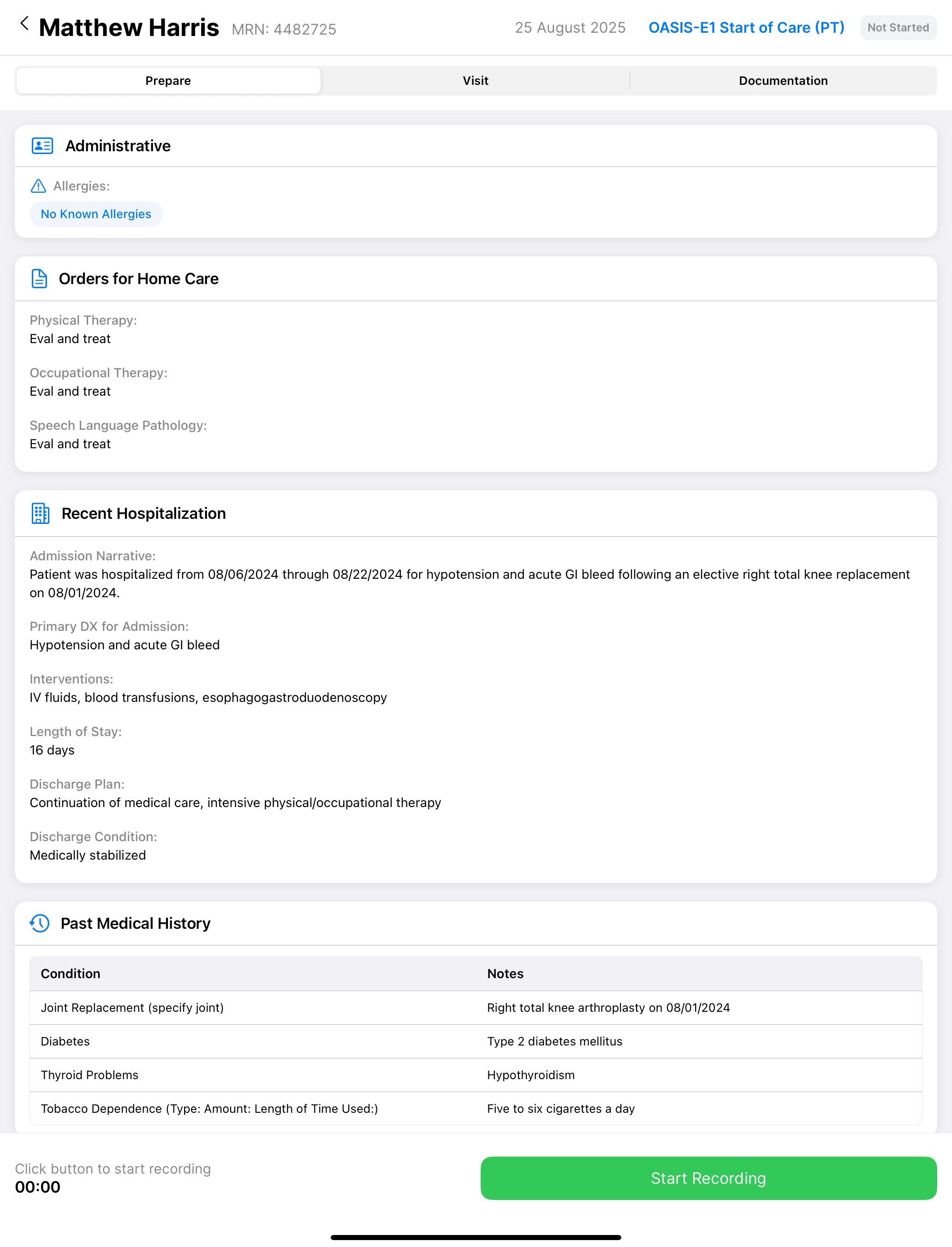
Nestmed captures your clinical documentation through ambient audio during visits. You speak naturally with patients while the AI creates structured notes in the background.
Open the Nestmed app to see your visits for the day. The preparation tab shows summarized information from referral documents - patient history, recent hospitalizations, medications, and care requirements.At the patient’s home, tap “Start Visit” and conduct your assessment normally. The system listens to your conversation, extracts clinical information, and builds documentation in real-time. You see the notes being created on screen and can make edits by voice or touch.The Visit Guide prompts for required assessments based on visit type. Start of Care visits include OASIS reminders. Wound visits prompt for measurements. Therapy visits focus on functional assessments. These prompts help ensure compliance without interrupting your workflow.
Speak naturally during clinical tasks. When checking blood pressure, say the values aloud. When examining a wound, describe what you see. When reviewing medications, discuss them with the patient. The AI captures this information and structures it into proper documentation.Quality checks flag potential issues immediately. If you document a fall risk without completing a fall assessment, you’ll see an alert. These real-time validations help ensure documentation is complete before leaving the home.
After the visit, review the generated documentation and make any final edits. Submit to your EMR with one tap. Documentation that previously took 30-45 minutes now takes a few minutes to review and approve.The app works offline in areas without internet connectivity. Documentation syncs automatically when you’re back online.